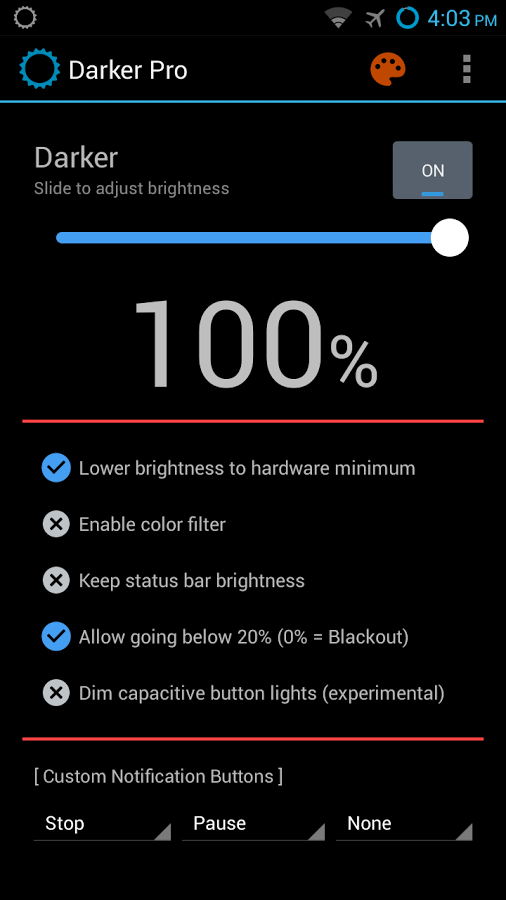
Darker app : Darkening souls..!! ^o^

Is your android screen so bright that you cant text your friends at night ?? Even the lowest brightness level can't help you from your Mum's or Dad's scolding. Here is an app that can help you from stressing your eyes at night .You can lower your screen brightness to extremely low levels. Use the built-in color filter to adjust the color of your display, perfect for filtering out harsh white backgrounds during the night.

This app is fully functional and does not include advertisements. Additional paid features are unlockable through an In-app purchase.


Paid features include:

» Auto-On & Auto-Off
» Start at boot
» Lower brightness below 20%
» Darken navigation bar
» Custom filter colors
» Root mode
» Customizable notification buttons
• Up to three buttons can be added for quick access.
• Buttons to increase and decrease the brightness (+5%, -5%, +10%, -10%)
• Buttons to set a specific brightness (@0%, @10%, @20%, ... , @90%, @100%)
• Quick toggles (stop, pause, reset, color filter)
Note: When manually installing APK files, Android blocks the "Install" button from being pressed when Darker is running. This is NOT a bug. It's a protective measure to prevent malicious apps from camouflaging the install button. Pausing Darker will solve this.
*The color filter is similar to how the desktop version of f.lux works. Selecting a redder color will reduce more bluelight emitted from the display.
Tasker Support


Comments

Popular posts from this blog

Which one is better Android or iOS ??

Features Android iOS Company Google Apple  Inc. OS Family Linux OS X, UNIX Customizability Can change almost everything even without rooting Limited unless jailbreak Initial release September  23, 2008 July 29, 2007 Programmed in C, C++, Java C, C++, Objective C Dependent on a PC or a Mac No No Easy media transfer Depends on model With desktop application Source model Open source Closed, with open source components Open Source Kernel, UI, and some standard apps It is not open source but based on open source Darwin OS Call feature supported Auto respond Auto respond, callback reminder, do not disturb mode Internet Browsing Google chrome(or android older versions) Mobile Safari Available on Many phones and tablets iPod Touch, ...

How to increase internal memory of your Android !!

Want you to increase Internal Memory of your Android !! 1- First you have to download Mini tool Partition and install on your PC. 2- Connect your SD card to your PC using card reader and backup your SD card data onto your PC as we are going to format it. 3-  Open Mini Tool Partition in your PC and when the wizards open click on your SD Card and select Delete option. Now your SD Card memory is unallocated. 4- Then Right click SD Card and select create option. A popup window will open giving you the choice for making partition ; create partition as primary and file system as FAT if SD Card is less than 4GB and FAT32 if it is more than 4GB. Leave about 256 MB or more space (your choice) for creating the next partition which will be your phone's internal memory. 5- Then select done and do right click on unallocated space of your SD Card and again click create option. Select Primary partition but change the file system to Ext2, Ext3 or Ext4. ( Note: Ext2 is recommended as most ROMs...

Vlc media player

As per my personnal experience from past 5-6 years this is the most trusty media player which I can trust upon to play any video.. it can play 3gp to full hd and even built and repair the broken crashed videos.. adding more there regular updates which are easily to download.. the setup is hardly(20-25 m.b) It’s short-cut key controls: